The Q3 2010 IntraLinks Deal Flow Indicator™ (DFI) was just released and reports a 38 percent increase in global M&A deal activity in Q3 2010 versus Q3 2009. In the last quarter, deal activity is up nine percent compared to Q2 2010, a 68 percent increase from the Q1 2009 low.
Results show six straight quarters of growth in M&A deal volume, with a 68 percent increase from Q1 2009
The overall positive trends are consistent with the following factors in the marketplace:
General improvement and stability in the market
Impending tax environment changes and stockpiles of committed capital have provided the return of private equity buyers and sellers
Reduced strategic buyer fear of “double dip” recession resulting in more exploration of opportunities to supplement slow organic growth prospects and enter new markets.
The Q3 2010 IntraLinks Deal Flow Indicator™ (DFI) was just released and reports a 38 percent increase in global M&A deal activity in Q3 2010 versus Q3 2009. In the last quarter, deal activity is up nine percent compared to Q2 2010, a 68 percent increase from the Q1 2009 low.
Results show six straight quarters of growth in M&A deal volume, with a 68 percent increase from Q1 2009
The overall positive trends are consistent with the following factors in the marketplace:
General improvement and stability in the market
Impending tax environment changes and stockpiles of committed capital have provided the return of private equity buyers and sellers
Reduced strategic buyer fear of “double dip” recession resulting in more exploration of opportunities to supplement slow organic growth prospects and enter new markets.
Daniel Simons' experiments on visual awareness have become famous. The primary conclusion drawn from his research is that we can miss incredibly obvious things, right in front of us, if our attention is focused elsewhere.
Test Your Awareness.
Watch this video and count how many passes the team in white makes.
This is worth doing so you experience it yourself.
Try to ignore the black team. Just focus on the white team, and see if you can accurately count how many times they pass the ball.
OK, click the video to do it now.
Did you get the right answer? Even though I knew what to expect, the result or effect was surprising.
By the way, there is a newer version of this video, here.
Think how often your focus blinds you to the obvious.
Change Blindness.
Missing an invisible gorilla or a moon-walking bear may seem strange. However, the next experiment may be more surprising.
This video demonstrates "change blindness". In an experiment, 75% of the participants didn't notice that the experimenter who bent under a counter was replaced by a different person.
If you liked that, here is a version done by Derrin Brown. It is quite clever and worth watching. It was even more surprising to me because it was done in public with "real people". How did people not notice a white male switching with a black guy (or an asian female) in the middle of a conversation?
Warning: Objects In Your Attention Span Are Fewer Than You Perceive.
Moment by moment, the brain selectively processes information it deems most relevant. Experiments, like these, show the limits of our capacity to encode, retain, and compare visual information from one glance to the next.
More importantly, this suggests that our awareness of our visual surroundings is far more sparse than most people intuitively believe. Consequently, our intuition can deceive us far more often than we perceive.
Clearly, in an information-rich environment, attention is a scarce and essential resource. So, pay attention (or automate the things you know need to be done right, every time).
Daniel Simons' experiments on visual awareness have become famous. The primary conclusion drawn from his research is that we can miss incredibly obvious things, right in front of us, if our attention is focused elsewhere.
Test Your Awareness.
Watch this video and count how many passes the team in white makes.
This is worth doing so you experience it yourself.
Try to ignore the black team. Just focus on the white team, and see if you can accurately count how many times they pass the ball.
OK, click the video to do it now.
Did you get the right answer? Even though I knew what to expect, the result or effect was surprising.
By the way, there is a newer version of this video, here.
Think how often your focus blinds you to the obvious.
Change Blindness.
Missing an invisible gorilla or a moon-walking bear may seem strange. However, the next experiment may be more surprising.
This video demonstrates "change blindness". In an experiment, 75% of the participants didn't notice that the experimenter who bent under a counter was replaced by a different person.
If you liked that, here is a version done by Derrin Brown. It is quite clever and worth watching. It was even more surprising to me because it was done in public with "real people". How did people not notice a white male switching with a black guy (or an asian female) in the middle of a conversation?
Warning: Objects In Your Attention Span Are Fewer Than You Perceive.
Moment by moment, the brain selectively processes information it deems most relevant. Experiments, like these, show the limits of our capacity to encode, retain, and compare visual information from one glance to the next.
More importantly, this suggests that our awareness of our visual surroundings is far more sparse than most people intuitively believe. Consequently, our intuition can deceive us far more often than we perceive.
Clearly, in an information-rich environment, attention is a scarce and essential resource. So, pay attention (or automate the things you know need to be done right, every time).
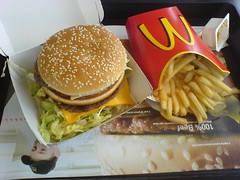
The Economist's Big Mac index seeks to make exchange-rate theory more digestible. They say it is arguably the world's most accurate financial indicator to be based on a fast-food item.
The Big Mac index is based on the theory of purchasing-power parity (PPP), according to which exchange rates should adjust to equalize the price of a basket of goods and services around the world. For them, the basket is a burger … a McDonald’s Big Mac.
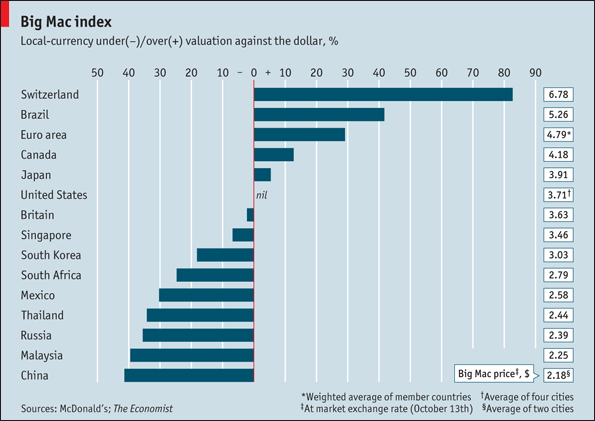
According to this measure, the most undervalued currency is the Chinese yuan, at 40% below its PPP rate. In China, a McDonald’s Big Mac costs just 14.5 yuan on average, the equivalent of $2.18 at market exchange rates. In America, the same burger averages $3.71.
The tensions caused by currency misalignments prompted Brazil’s finance minister to complain last month that his country was a potential casualty of a “currency war”. The Swiss, who avoid most wars, are in the thick of this one. Their franc is the most expensive currency on our list.
The table below shows by how much, in Big Mac PPP terms, selected currencies were over- or undervalued.
The index is supposed to give a guide to the direction in which currencies should, in theory, head in the long run. It is only a rough guide, because its price reflects non-tradable elements such as rent and labor. For that reason, it is probably least rough when comparing countries at roughly the same stage of development.
Which Currencies Are Beating-Up On the Dollar?
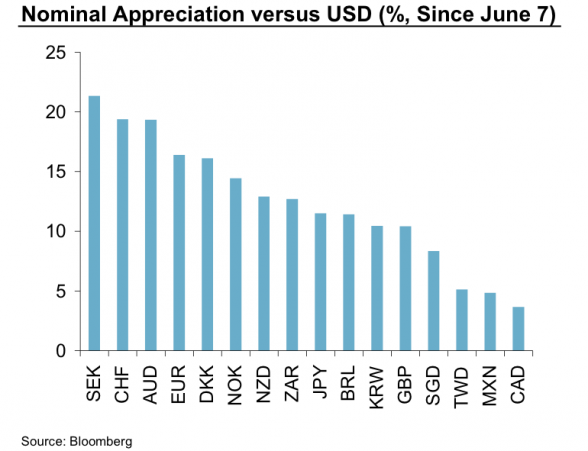
You know the dollar has been in freefall since the middle of the summer. BusinessInsider posted a chart, from Morgan Stanley, showing which currencies have appreciated the most since then.
The big winner? The Swedish Krona. Note that the much-hyped yen is just in the middle of the pack.
The Economist's Big Mac index seeks to make exchange-rate theory more digestible. They say it is arguably the world's most accurate financial indicator to be based on a fast-food item.
The Big Mac index is based on the theory of purchasing-power parity (PPP), according to which exchange rates should adjust to equalize the price of a basket of goods and services around the world. For them, the basket is a burger … a McDonald’s Big Mac.
According to this measure, the most undervalued currency is the Chinese yuan, at 40% below its PPP rate. In China, a McDonald’s Big Mac costs just 14.5 yuan on average, the equivalent of $2.18 at market exchange rates. In America, the same burger averages $3.71.
The tensions caused by currency misalignments prompted Brazil’s finance minister to complain last month that his country was a potential casualty of a “currency war”. The Swiss, who avoid most wars, are in the thick of this one. Their franc is the most expensive currency on our list.
The table below shows by how much, in Big Mac PPP terms, selected currencies were over- or undervalued.
The index is supposed to give a guide to the direction in which currencies should, in theory, head in the long run. It is only a rough guide, because its price reflects non-tradable elements such as rent and labor. For that reason, it is probably least rough when comparing countries at roughly the same stage of development.
Which Currencies Are Beating-Up On the Dollar?
You know the dollar has been in freefall since the middle of the summer. BusinessInsider posted a chart, from Morgan Stanley, showing which currencies have appreciated the most since then.
The big winner? The Swedish Krona. Note that the much-hyped yen is just in the middle of the pack.
Professor Philip Zimbardo explains how our individual perspectives of time affect our work, health and well-being. Zimbardo is talking about psychological time (subjective time), not the objective time dictated by the clocks on our phones. As you might guess, "time" influences how we perceive ourselves, how we view relationships, and how we act in the world.
This short video offers some eye-opening insights.
Below is the illustrated version of "The Secret Powers of Time". The original video of Zimbardo speaking at a podium follows. While it has the same message, the visuals are very different. This side-by-side comparison shows the value of visual synthesis note-taking.
Even my dog understands when I give him certain commands. Shouldn’t my computer be at least that smart?
I'm always on the lookout for software that promises to reduce repetitive tasks and save time. Lately, I’ve been using PhraseExpress from Bartels Media. With it, my computer behaves the way I want it to, and acts smarter than it did before.
First things first … the obvious use of PhraseExpress is to create shortcuts for commonly used words and phrases.
There are certain phrases that you probably type over-and-over again. Some of them are short, like your name; others are little longer, like the name of your website or the way you sign your name at the end of an e-mail. Then there are phrases that are considerably longer than that, yet are still something that you end up using considerably more often than you like typing it. Well, it turns out you don't have to type it anymore.
For example, if I type "fyit", PhraseExpress replaces that with "for your information, I thought you might want to see this …" and then adds my signature. Another one I use often is “ttc”, which expands to "Thank you for your time and consideration." Realize, though, that you can add whatever phrases work for you. During the course of a week, PhraseExpress saves me thousands of keystrokes and a considerable amount of time.
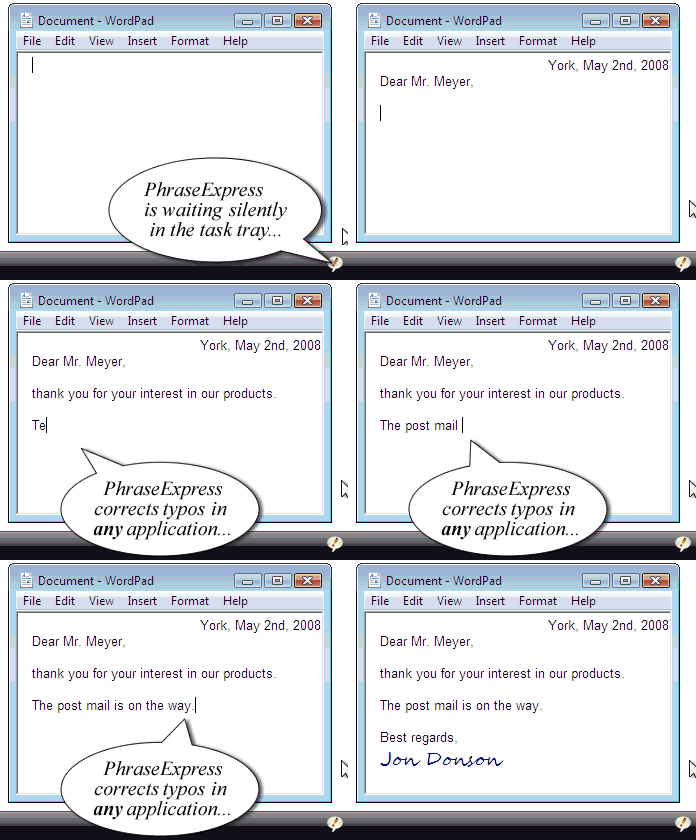
A related feature is to create replacement text to correct certain words that I commonly mistype or misspell. My fingers don't always go where they should, but at least I'm consistent about it. That means if I somehow transpose a letter, the correct spelling ends up in the document without me having to slow down, backup, or lose focus.
It Starts Saving You Time As Soon As You Install It.
PhraseExpress works as soon as you install it, because it comes with thousands of pre-built text replacements and phrases. The real power, however, is that you can add your own information and customize what's there as much as you want.
In addition to the phrases that come with the software, Bartels also offers several free add-on modules for you to download and install. One of these allows you to do math. So if you type “20+80 =” that will pop up a box letting you replace that with the answer — or you can ignore it and keep typing. Another feature can translate date math; so, "two days from now" could convert and insert the correct day and date into your document. I created a phrase so that "dd" inserts the current date; frankly, I use that considerably more than I thought I would. For practical puproses, your imagination is the only limit.
I See You, I Know You … And I Can Guess Your Command.
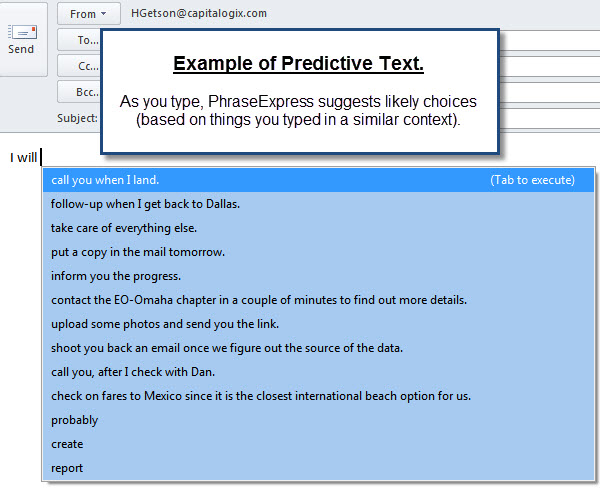
The second major feature that PhraseExpress offers is a predictive text capability that remembers what you typed before, and suggests a word or phrase that you've typed several times in that situation.
At first, I was skeptical that I would appreciate that feature. Now, it's something I look forward to and appreciate each time it pops up. The predictive text feature continues to get smarter the more you use it. Here is an example captured while using e-mail.
Taking Automation to the Next Level.
Another PhraseExpress feature worth noting is its surprisingly full-featured scripting language. This allows you to automate a repetitive task, even if it contains multiple steps. It can be as simple as forwarding an e-mail to a certain group of people, or something that reduces a series of tasks that used to take me close to half an hour – but with the PhraseExpress script now gets done in about a minute without any intervention on my part.
Another way I use scripting is to add a random thought to ponder to my e-mail signature. Any time I see a quote or idea that I want to save, it only takes a few keystrokes to add it to my collection. And then a simple script allows me to randomly add one of those "thoughts to ponder" to my e-mail signature.
Words Are Powerful.
Words are powerful, and they're easier to remember than complex commands like “Control-Shift-F5”. So, I like that I can assign short words or phrases to trigger the actions I want. I'm way more likely to remember it, and that means I'm way more likely to use it.
You can use the basic version of PhraseExpress at no cost. However, a quick trial will easily justify the purchase of a more powerful version.
The best thing about PhraseExpress is that I forget it's there … and it continues to work saving time, money, and frustration. Another great thing about it is that it's easy to add phrases or customize the way it works. After it is broken in, it naturally fits you and the way you work. Finally, I appreciate how responsive the company has been in providing support and listening to feature requests.
Bottom-Line: PhraseExpress is a terrific piece of software. It is a very well designed and intuitive program that removes many of the frustrations you face sitting in front of your computer each day.
Even my dog understands when I give him certain commands. Shouldn’t my computer be at least that smart?
I'm always on the lookout for software that promises to reduce repetitive tasks and save time. Lately, I’ve been using PhraseExpress from Bartels Media. With it, my computer behaves the way I want it to, and acts smarter than it did before.
First things first … the obvious use of PhraseExpress is to create shortcuts for commonly used words and phrases.
There are certain phrases that you probably type over-and-over again. Some of them are short, like your name; others are little longer, like the name of your website or the way you sign your name at the end of an e-mail. Then there are phrases that are considerably longer than that, yet are still something that you end up using considerably more often than you like typing it. Well, it turns out you don't have to type it anymore.
For example, if I type "fyit", PhraseExpress replaces that with "for your information, I thought you might want to see this …" and then adds my signature. Another one I use often is “ttc”, which expands to "Thank you for your time and consideration." Realize, though, that you can add whatever phrases work for you. During the course of a week, PhraseExpress saves me thousands of keystrokes and a considerable amount of time.
A related feature is to create replacement text to correct certain words that I commonly mistype or misspell. My fingers don't always go where they should, but at least I'm consistent about it. That means if I somehow transpose a letter, the correct spelling ends up in the document without me having to slow down, backup, or lose focus.
It Starts Saving You Time As Soon As You Install It.
PhraseExpress works as soon as you install it, because it comes with thousands of pre-built text replacements and phrases. The real power, however, is that you can add your own information and customize what's there as much as you want.
In addition to the phrases that come with the software, Bartels also offers several free add-on modules for you to download and install. One of these allows you to do math. So if you type “20+80 =” that will pop up a box letting you replace that with the answer — or you can ignore it and keep typing. Another feature can translate date math; so, "two days from now" could convert and insert the correct day and date into your document. I created a phrase so that "dd" inserts the current date; frankly, I use that considerably more than I thought I would. For practical puproses, your imagination is the only limit.
I See You, I Know You … And I Can Guess Your Command.
The second major feature that PhraseExpress offers is a predictive text capability that remembers what you typed before, and suggests a word or phrase that you've typed several times in that situation.
At first, I was skeptical that I would appreciate that feature. Now, it's something I look forward to and appreciate each time it pops up. The predictive text feature continues to get smarter the more you use it. Here is an example captured while using e-mail.
Taking Automation to the Next Level.
Another PhraseExpress feature worth noting is its surprisingly full-featured scripting language. This allows you to automate a repetitive task, even if it contains multiple steps. It can be as simple as forwarding an e-mail to a certain group of people, or something that reduces a series of tasks that used to take me close to half an hour – but with the PhraseExpress script now gets done in about a minute without any intervention on my part.
Another way I use scripting is to add a random thought to ponder to my e-mail signature. Any time I see a quote or idea that I want to save, it only takes a few keystrokes to add it to my collection. And then a simple script allows me to randomly add one of those "thoughts to ponder" to my e-mail signature.
Words Are Powerful.
Words are powerful, and they're easier to remember than complex commands like “Control-Shift-F5”. So, I like that I can assign short words or phrases to trigger the actions I want. I'm way more likely to remember it, and that means I'm way more likely to use it.
You can use the basic version of PhraseExpress at no cost. However, a quick trial will easily justify the purchase of a more powerful version.
The best thing about PhraseExpress is that I forget it's there … and it continues to work saving time, money, and frustration. Another great thing about it is that it's easy to add phrases or customize the way it works. After it is broken in, it naturally fits you and the way you work. Finally, I appreciate how responsive the company has been in providing support and listening to feature requests.
Bottom-Line: PhraseExpress is a terrific piece of software. It is a very well designed and intuitive program that removes many of the frustrations you face sitting in front of your computer each day.
Back when I was in school, my father asked me to do something. I don't remember what it was, specifically … but it was a normal thing for a father to ask a son to do.
Later that day, while we were talking, he asked how my day went. I told him about all the things I did. Then, he asked whether I did the thing he asked me to do. I tried to explain that because of how busy I had been, I didn't have time to do what he asked.
He frowned, and I still remember the look in his eye when he told me that from his standpoint, I hadn't done anything.
That put things in a different context.
Each day we make a host of commitments great and small. If my to-do list has 15 items on it, and I do the 13 or 14 of them … then on one hand, I can feel good about how productive I was. Yet, on the other hand, chances are that the one or two things I didn't do were the only things that were supposed to get done for the person whose task got put off until another day.
Getting Things Done.
Stephen Covey makes a big distinction between importance versus urgency. It's easy to lose sight of what needs to get done if you fill your day with interruptions, distractions, busywork, or time-wasters.
By understanding what is both important and urgent it's easy to clarify the value of what really needs to get done.
Understanding why things need to get done is also a big step forward in terms of prioritizing what you commit to do. For example, Scott Scheper suggests your goal should be to balance out your tasks so that 20% are spent on reactive tasks, and 80% are spent on proactive tasks. Why? Because reactive tasks will make you a living, while proactive tasks will make you successful.
Ultimately, there are many ways to sort, sift, filter and prioritize your list.
There is a rule-of-thumb that 20% of your activities will account for 80 percent of your success (this is often called the "Pareto Principle" or the "80%-20% Rule"). In other words, if you have 100 tasks in your task list, there probably will be about 20 of those that are the key ones to focus on. The key is to find a prioritization method that helps you pinpoint these tasks.
I use several tools. Toodledo and Nozbe are both easy-to-use online to-do lists with a great iPhone client. For teams, I highly recommend the stuff from 37 Signals.

 The Q3 2010 IntraLinks Deal Flow Indicator™ (DFI) was just released and reports a 38 percent increase in global M&A deal activity in Q3 2010 versus Q3 2009. In the last quarter, deal activity is up nine percent compared to Q2 2010, a 68 percent increase from the Q1 2009 low.