Just for Fun

  • Turn Talking Into Typing, Automatically

    Dragon NaturallySpeaking 10 gets it right.  Finally speech recognition that is surprisingly accurate, even with little or no training.  Here is a 20-second video of me talking – and it typing.

    I wrote about using dictation before.  This is different, because it gets smarter as you use it. There are easy ways to edit results, and the program learns from each correction.

    For me, I know it works because I find myself using it to create drafts of many things.  And if it wasn't easier and more convenient than typing … I wouldn't use it.  Instead, I often wait to create the draft at the computer with Dragon NaturallySpeaking.  The writing ends-up sounding more natural if the first draft was spoken.

    This program has matured nicely.  Earlier versions were temperamental and took a long time to train.  This one worked out-of-the-box.  I use it with a simple usb microphone (not even the noise-canceling headset they include). It also works with my handheld Olympus voice recorder.

    Give it a try.

  • Turn Talking Into Typing, Automatically

    Dragon NaturallySpeaking 10 gets it right.  Finally speech recognition that is surprisingly accurate, even with little or no training.  Here is a 20-second video of me talking – and it typing.

    I wrote about using dictation before.  This is different, because it gets smarter as you use it. There are easy ways to edit results, and the program learns from each correction.

    For me, I know it works because I find myself using it to create drafts of many things.  And if it wasn't easier and more convenient than typing … I wouldn't use it.  Instead, I often wait to create the draft at the computer with Dragon NaturallySpeaking.  The writing ends-up sounding more natural if the first draft was spoken.

    This program has matured nicely.  Earlier versions were temperamental and took a long time to train.  This one worked out-of-the-box.  I use it with a simple usb microphone (not even the noise-canceling headset they include). It also works with my handheld Olympus voice recorder.

    Give it a try.

  • “Now” Widget

    I saw this and spent some time watching the items change. 

    It's got lots of
    tickers and content that change as you watch.  You just weren't aware
    that you would enjoy knowing how many emails are being sent or spam
    emails being received.  There are also recent news updates from The New
    York Times, CNN, Newsvine, top Google searches of the day, and lots
    more.

    Here are some tidbits from the background audio patter.

    • "Welcome to Now," the computer says.
    • "How about a big bowl of Now?"
    • "Please keep your hands inside the moment."
    • "Your hair has grown 5 millionths of centimeter in the last second."
    • "It is Now in all timezones."

    Very clever and well-done.

    Below is a limited version.  The link to the complete version is below. 

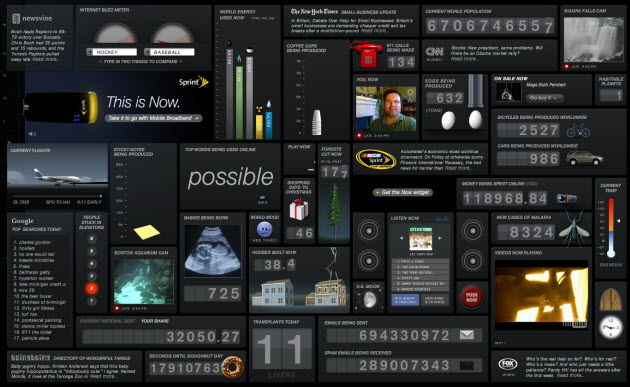
    Click to play with the full widget.  Here is a screenshot of it – and, yes, that is me in the middle.

    081108 Now Widget Graphic 630p

  • “Now” Widget

    I saw this and spent some time watching the items change. 

    It's got lots of
    tickers and content that change as you watch.  You just weren't aware
    that you would enjoy knowing how many emails are being sent or spam
    emails being received.  There are also recent news updates from The New
    York Times, CNN, Newsvine, top Google searches of the day, and lots
    more.

    Here are some tidbits from the background audio patter.

    • "Welcome to Now," the computer says.
    • "How about a big bowl of Now?"
    • "Please keep your hands inside the moment."
    • "Your hair has grown 5 millionths of centimeter in the last second."
    • "It is Now in all timezones."

    Very clever and well-done.

    Below is a limited version.  The link to the complete version is below. 

    Click to play with the full widget.  Here is a screenshot of it – and, yes, that is me in the middle.

    081108 Now Widget Graphic 630p

  • Seemingly Endless Elections

    081107 Red or Blue Pill
    The election is finally over.

    Did you take the Red Pill or the Blue Pill?  No, not that blue pill.

    Regardless, it seemed to take forever.  Didn't it?

    Here is a political cartoon that sums it up well.
    Political Cartoon Election Lasting 4 Years

    from Boston Globe.

    Also, here is a skit from Saturday Night Live.  This provides an interesting commentary on how elections are changing.  John McCain appears live, the weekend before election day, and participates in what I took to be gallows humor.  Was it a Maverick move?

    Here is a link to a description of the jokes. (CSMonitor Blog)

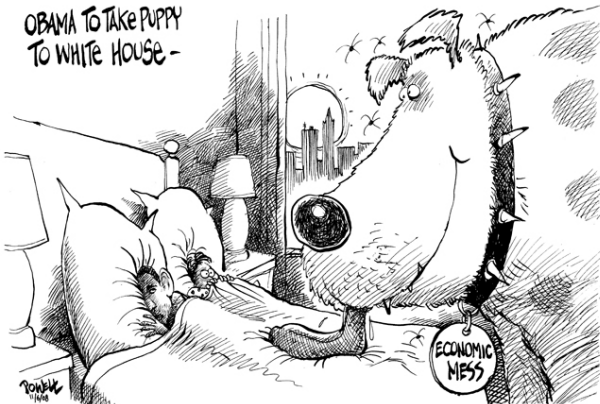
    Since I indulging in a little election humor, here is one more that made me smile.

    081107 Obama's Puppy from USAToday

  • Seemingly Endless Elections

    081107 Red or Blue Pill
    The election is finally over.

    Did you take the Red Pill or the Blue Pill?  No, not that blue pill.

    Regardless, it seemed to take forever.  Didn't it?

    Here is a political cartoon that sums it up well.
    Political Cartoon Election Lasting 4 Years

    from Boston Globe.

    Also, here is a skit from Saturday Night Live.  This provides an interesting commentary on how elections are changing.  John McCain appears live, the weekend before election day, and participates in what I took to be gallows humor.  Was it a Maverick move?

    Here is a link to a description of the jokes. (CSMonitor Blog)

    Since I indulging in a little election humor, here is one more that made me smile.

    081107 Obama's Puppy from USAToday

  • Staying Informed and Up-To-Date

    Library Computers 250p
     Last week I went to visit my son, Ben, at a Duke University parents weekend. This April, I will return for my 25th reunion. A lot has changed since I was in college.

    One of the biggest changes I noticed was how much information the Internet puts at each person's fingertips, regardless of where they are on campus. Doing research no longer means a trip to the library. And books, magazines or newspapers are a distant second-place to online research and news items.

    Staying informed is a big part of my business as well. I used to receive several newspapers daily; and my morning routine started by scanning them cover-to-cover and clipping items that might be of interest to me are someone I knew. I rarely read a newspaper anymore, except when I'm on airplanes.

    Now, my daily routine uses news-feed readers and web sites to access a wide variety online content. This is a great way to sort, sift, filter, and act on relevant information.

    So, this week, I want to share some of the news sites that I find useful.

    News Aggregators:

    These
    are sites that combine news from many sources and create an updated
    mash up of information it gives me a quick view into what's happening
    each day.

    The Basics: There are no surprises here; still Google News and Yahoo! News are so good that I have to list them anyway.

    Next Generation: Some of the newer aggregation sites are quite clever.  Here are a few that I really enjoy:

    • NewsCred: Easily personalized to pick sources and rank by credibility.
    • Topix: Comprehensive and well categorized. Has a nice look and feel. Uses RSS well.
    • Newser: Nice summaries and related links. Uses pictures well, too.
    • Daylife: an example of an intelligent content service platform (read: little human editing).
    • Newsvine: well done; with social-sourced news flagging.
    • Regator: Specialty is organizing and finding blog posts.
    • Slate: A little different than the others; more editorial content.

    Slate Logo
    Slate has a number of interesting features.  Today's Papers summarizes current newspaper coverage.  Another summarizes current magazine stories.  And a third, called Today's Business Press, does just what you'd expect. 

    All three are quick to read and well done.

    Also worth checking: Digg, Technorati, and Techmeme.

  • Staying Informed and Up-To-Date

    Library Computers 250p
     Last week I went to visit my son, Ben, at a Duke University parents weekend. This April, I will return for my 25th reunion. A lot has changed since I was in college.

    One of the biggest changes I noticed was how much information the Internet puts at each person's fingertips, regardless of where they are on campus. Doing research no longer means a trip to the library. And books, magazines or newspapers are a distant second-place to online research and news items.

    Staying informed is a big part of my business as well. I used to receive several newspapers daily; and my morning routine started by scanning them cover-to-cover and clipping items that might be of interest to me are someone I knew. I rarely read a newspaper anymore, except when I'm on airplanes.

    Now, my daily routine uses news-feed readers and web sites to access a wide variety online content. This is a great way to sort, sift, filter, and act on relevant information.

    So, this week, I want to share some of the news sites that I find useful.

    News Aggregators:

    These
    are sites that combine news from many sources and create an updated
    mash up of information it gives me a quick view into what's happening
    each day.

    The Basics: There are no surprises here; still Google News and Yahoo! News are so good that I have to list them anyway.

    Next Generation: Some of the newer aggregation sites are quite clever.  Here are a few that I really enjoy:

    • NewsCred: Easily personalized to pick sources and rank by credibility.
    • Topix: Comprehensive and well categorized. Has a nice look and feel. Uses RSS well.
    • Newser: Nice summaries and related links. Uses pictures well, too.
    • Daylife: an example of an intelligent content service platform (read: little human editing).
    • Newsvine: well done; with social-sourced news flagging.
    • Regator: Specialty is organizing and finding blog posts.
    • Slate: A little different than the others; more editorial content.

    Slate Logo
    Slate has a number of interesting features.  Today's Papers summarizes current newspaper coverage.  Another summarizes current magazine stories.  And a third, called Today's Business Press, does just what you'd expect. 

    All three are quick to read and well done.

    Also worth checking: Digg, Technorati, and Techmeme.
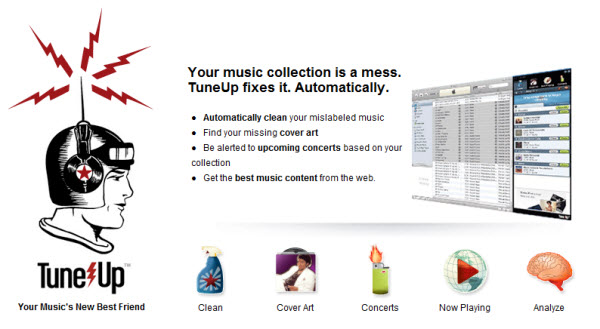
  • Tune-Up Your iTunes Music Collection, Automatically

    For years I took my music collection for granted. I ripped many of my
    old CDs to disk, and simply allowed the computer to save the
    information anyway it chose to. Over time, it became clear that there were
    mistakes, missing information and, in general … a mess.

    After several limited attempts to clean my collection manually, I
    started looking for a better way. I certainly found something that
    worked for me. It's called Tune-Up.

    080919 iTunes Tune-Up Service
    Tune-up is a software add-on designed to clean your iTunes music collection. For me, that means fixing and standardizing the artist, album, song titles, and other data that helps me find the right music for my mood. I also appreciate how well it finds and updates cover art for songs and albums.

    Tune-Up accomplishes a lot of its magic by connecting to various data services (like Gracenote's MusicID).  While Tune-Up does most of the heavy lifting, I appreciate that it
    allows me to have the final say. It's very easy to accept its
    suggestions; yet, I still have the ability to ignore or override it
    based on how I want my music categorized.

    There's also feature that recognizes the song you're playing and displays other relevant information, like related concert dates in your area, links to videos by the artist, and recommendations about other songs or albums you might like.

    Bottom line:  This tool saved me a lot of time and works better than the other tools I've tried.

    If you don't use iTunes, or just want to check-out another good alternative, you can also look at MediaMonkey. And if you want a clean your music collection by finding duplicate tracks or to clean-out entries where you deleted or moved the actual music file, I recommend looking at Marklesoft's Dupe Eliminator.

  • Tough Week?

    Last week I wrote that trading is often stressful; and learning how to handle the emotional and physiological response patterns is an important step toward long-term success.


    This week the markets were at their manic-depressive best, which can be tough for traders.  Investors were like hyperactive first graders playing musical chairs.


    Here are some funny videos of how some people handle their tough week.


    The first video shows a man beating his computer.  There is something primal about it that makes it memorable.  I saw this many years ago.  Yet I find myself thinking about this one from time-to-time.  So, I put it first.


    Here is the direct link.


    I saw this one on on the Huffington Post.  It has a lot going on; way too much to describe.  It is more fun to just watch, anyway.


    Here is the direct link.


    Finally, this one shows a man in a coffee shop freaking-out after his computer hangs, apparently he has a presentation to give in ten-minutes, so getting arrested seemed like a good idea.


    Here is the direct link.  (Hat-Tip to Gelflog)